

Local-first and the SQLite Bet
Why Wealthfolio's portfolio lives in a SQLite file on your machine instead of a cloud database, and what that decision cost us to make work.
The first version of Wealthfolio was a weekend project, and the database choice got about ten seconds of thought before SQLite won. It was the obvious move: a desktop app, no server to run, no dependency on Postgres being installed somewhere. SQLite is a file. Drop it in the user’s home directory and you’re done.
What wasn’t fully appreciated at the time is that this one technical decision turned out to be the product decision. Local-first isn’t a marketing line; it’s the constraint that shapes everything Wealthfolio is and isn’t.
The constraint
When all the data lives in a single file on your machine, a lot of things become true that aren’t true of the average SaaS app:
- We can’t see your portfolio. There’s no database to query. There’s no server with your activities in it. If you don’t tell us what’s in your account, there’s no way for us to know.
- The app works offline. Market data and the updater are the only things that hit the network. Everything else is local reads and writes.
- A bad deploy can’t break your data. There’s no migration that wipes your records because a bug shipped to production at 11pm. Your data state is yours.
- You can’t lose your data because Wealthfolio went out of business. Worst case the app becomes unmaintained and an unencrypted database still opens in standard SQLite tools. Encrypted databases need SQLCipher-compatible tools and their original key, or a portable backup exported while you still have access.
That last one matters more than expected. A surprising number of personal-finance tools have been shut down over the years: Mint, Quicken Online, various local-bank aggregators. Every shutdown is a story of someone trying to find a CSV export the week before the lights went off. The local-first model side-steps that entirely. Your file isn’t going anywhere.
You own the data and the app
The deeper point is ownership. Your portfolio is a file you hold, and Wealthfolio is open source, so neither the data nor the app depends on us staying in business. If the file is yours and the code is public, the worst case is that development stops, not that your records disappear.
We are not the first to bet on this. Obsidian keeps your notes as plain Markdown files you own; Steph Ango’s “File over app” essay names the principle, that the app is a lens and the file outlasts the software. DHH and 37signals’ Once line sells software you buy once and run yourself, with no subscription and no remote kill switch.
Wealthfolio sits one step further along the same axis: not just self-hosted versus SaaS, but local-first versus server-anything. Even a self-hosted server has an operator who can fumble a deploy. A file on your machine does not.
What the SQLite bet cost us
The flip side is that local-first makes everything you take for granted in a SaaS app hard.
No built-in sync. If you want your phone and your laptop to agree on what you own, you need some kind of replication layer. Wealthfolio shipped without one for almost a year. People worked around it by exporting and re-importing. That’s how Connect came about: end-to-end encrypted sync built on top of the local-first foundation, opt-in for the people who want it. The design problem of “sync that we can’t read” is its own essay.
Packaging is hard. Shipping a desktop app means being in the OS package signing business. Windows SmartScreen flags new releases until enough downloads accumulate. macOS notarization breaks if an entitlement gets forgotten on a bump. AppImages need exactly the right WebKit version on every distro. None of these are intellectually interesting problems. They’re an endless tax to pay so the app installs cleanly for everyone.
No “let me check what your data looks like” support. When someone files an issue that boils down to “my portfolio shows a weird number”, there’s no admin dashboard to open. They have to paste data, run an export, or screenshot. Sometimes that’s awkward, but it’s the right side of awkward. The alternative is having a god-mode view into everyone’s net worth, which is exactly what Wealthfolio was built to avoid.
Updates are slower to roll out. A SaaS bug fix is git push and everyone gets it.
A desktop bug fix is git tag, build, sign, upload to GitHub, wait for users to
notice. The lower velocity has grown on us; it forces harder thinking before each
release. But it’s a real difference from web shipping.
Why SQLite specifically
Alternatives got considered. Briefly:
- Embedded RocksDB or LevelDB: way more capable for high-throughput workloads, but it’d mean writing the query layer, the schema migrations, the whole stack from scratch. A portfolio tracker doesn’t need that throughput.
- DuckDB: great for analytics but the maturity wasn’t there at the start, and being the canary for a lot of edge cases wasn’t appealing.
- A flat-file format (JSON, Parquet, CSV): tempting because the file is the product, but you give up referential integrity and you reinvent half a database to do anything non-trivial.
SQLite wins because it’s all the things you want a personal-finance file to be:
- A single file you can copy, version, encrypt, or back up.
- ACID, so a power cut doesn’t corrupt your portfolio.
- Faster than the network you’d use to reach a remote database.
- Old, boring, and battle-tested. The format itself is a recommended storage format by the US Library of Congress for archival data.
The trade-offs (single writer, limited concurrent connections, no built-in replication) don’t matter for a single-user app.
How the file is managed
What the file holds is unremarkable: accounts, activities, assets, quotes, goals and contribution limits, plus precomputed snapshots of positions and net-worth points so the dashboard does not replay the whole history on every load. The more interesting part is the small amount of Rust that keeps it correct.
The Rust side uses Diesel as the ORM and migration runner. Schema migrations
live in crates/storage-sqlite/migrations/ and run on app start, followed by a
WAL checkpoint so the main .db file is current before the pool comes up.
The connection layer is a small r2d2 pool (max eight connections) with a
ConnectionCustomizer that re-pins the per-connection PRAGMAs Wealthfolio cares
about on every checkout: foreign_keys = ON, busy_timeout = 30000,
synchronous = NORMAL. journal_mode = WAL is persistent, so it’s set once when
the database is first opened. WAL lets readers and the writer coexist without
blocking each other; the busy timeout keeps the rare contention case from
surfacing as a user-visible error.
Writes go through a single-writer actor. Every mutating operation is sent
over a Tokio MPSC channel to one dedicated pooled connection that owns all write
transactions, each run as an immediate_transaction; reads use the pool freely.
This is the SQLite-on-async-Rust pattern that sidesteps the “database is locked”
problem cleanly: there’s only ever one writer, so there’s nothing to contend on.
The handle lives in crates/storage-sqlite/src/db/write_actor.rs if you want to
see what that boring little piece of infrastructure looks like.
It’s deeply unexciting code. That’s the point: your portfolio shouldn’t be doing anything exciting at rest.
Put together, the whole loop fits in your head and never leaves your machine:
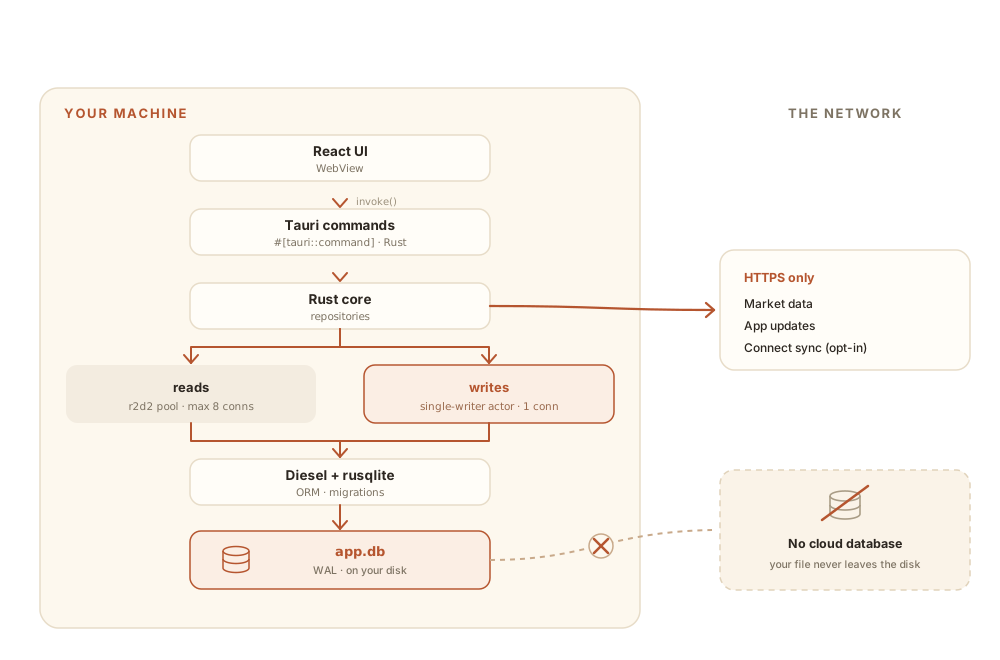
Only market data, the updater, and opt-in Connect sync ever touch the wire. Every read and write of your actual portfolio happens entirely inside that left-hand box.
What you can do with this
Because the file is yours:
- Back it up however you back up files. Time Machine, Restic, a USB stick, your encrypted cloud drive. Close the app before copying its installation files, and preserve the original key separately if the database is encrypted. A portable backup with its own password can be restored without that installation key.
- Move between machines with a portable backup. Export a password-protected
.wfbackupand restore it on the destination. Copying an encrypted database alone doesn’t carry its key with it. The data export guide covers the steps. - Query it directly with the SQLite CLI if the database is unencrypted, or with
SQLCipher-compatible tooling and the original key if it is encrypted. An explicitly
unencrypted
.dbexport also works with standard SQLite tools. (Be careful: the schema is internal and changes between versions. But it’s there.) - Inspect what the app sees. If something looks off, opening the file in DB Browser for SQLite often resolves “what’s going on” in thirty seconds. Use an unencrypted export, or compatible SQLCipher support and the key for an encrypted file.
This needs to keep being true. The day Wealthfolio starts mediating access to your own data is the day it stops being the tool it set out to be.
The bet
Local-first is a bet on a specific kind of user: someone who’d rather own their financial data outright than pay someone else to host it, even if owning it means a little more work. It’s not the bet most personal-finance apps make. Most apps assume the user wants the maximum convenience and is willing to trade access to their bank accounts for it.
Wealthfolio is for the other crowd. The Connect subscription exists for the people who want some of that convenience back without giving up the local-first foundation: sync, broker integrations, household sharing. But the core stays where it started: a SQLite file on your machine, doing exactly what you asked it to do, and nothing else.
That bet has paid off. Thousands of people use it, and many have paid for Connect to support development. The core stays free and fully local, so whatever happens to the company or the subscription, your portfolio is a file you keep, not something that can be switched off remotely.
That’s worth all the AppImage debugging in the world.